RCPGenerator
title: “Random Close Packing Code – C++, MATLAB & Python” description: “Fast, multi‑language toolkit to generate random close packings, jammed states, and dense sphere packings in 2–N dimensions.” keywords: [“random close packing”, “jammed state”, “dense packing”, “particle configurations”, “hypersphere packing”, “C++”, “MATLAB”, “Python”] —
N‑Dimensional Random Close Packing Generator

RCPGenerator
RCPGenerator is a particle packing algorithm implemented in Python, C++, and MATLAB for generating random close packings (dense particle packings) of hard particles.
It supports:
- 2D disk packings, 3D sphere packings, and hypersphere packings in arbitrary dimensions
- Periodic or hard-wall boundary conditions
- Flat and curved container geometries including boxes, circles, cylinders, and spheres
- Highly polydisperse particle distributions
RCPGenerator can be used both as a sphere packing generator and as a particle packing simulation tool for computational physics and materials modeling.
Key capabilities include:
- Higher-dimensional packing algorithms (tested up to 7 dimensions)
- Initial particle configuration seeding
- Arbitrary and predefined particle size distributions
- Periodic and hard-wall boundary conditions
- Rectangular, cylindrical, and spherical container geometries
- Very high polydispersity, converging for size ratios greater than 100 in 2D
The code is suitable for research and simulations involving:
- granular materials
- colloids
- dense particle systems
- physics simulations
- 3D printing and powder modeling
Python Interface
The repository includes a Python interface that wraps the validated C++ packing engine using pybind11.
The Python API provides:
- a high-level
rcpgenerator.Packingclass - visualization utilities for 2D and 3D packings
- example workflows for packings in boxes and curved containers
- notebook-based tutorials and demonstrations
See the python/ directory and the getting_started.ipynb notebook for installation instructions and interactive examples.
Example: Generating Dense Sphere Packing in Python
# Python code snippet to generate dense 3D sphere packing in unit box
from rcpgenerator import Packing

p = Packing(N=500, Ndim=3, box=[1,1,1]) # Initialize a unit box with 500 spherical particles in 3D
p.pack() # Generating densing packing of spheres
p.show_packing() # Display dense packing
c++ Interface
The original C++ implementation provides executables for generating dense packings using an ADAM / Verlet optimization algorithm.
These tools are designed for large-scale packing generation and high-dimensional studies.
Matlab Interface
The repository also includes a MATLAB interface for generating packings and visualizing results.
# Matlab code snippet to generate dense 3D sphere packing (variable initialization required, see matalb/examples for more details)
% Initialize Particles
[x0, D0] = initialize_particlesND(phi, N, Box, distribution);

plot_particles_periodic(x0, D0, Box)

% Create Packing
[x, D, U_history, phi_history, Fx] = CreatePacking(x0, D0, Box, walls, fix_height, verbose);

% Plot packing
plot_particles_periodic(x, D, Box)
See the matlab/examples directory for full usage examples.
 |
 |
 |
 |
|---|---|---|---|
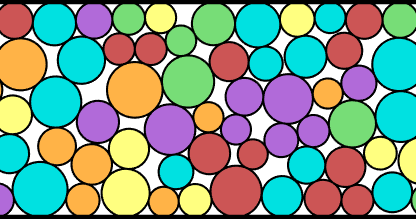
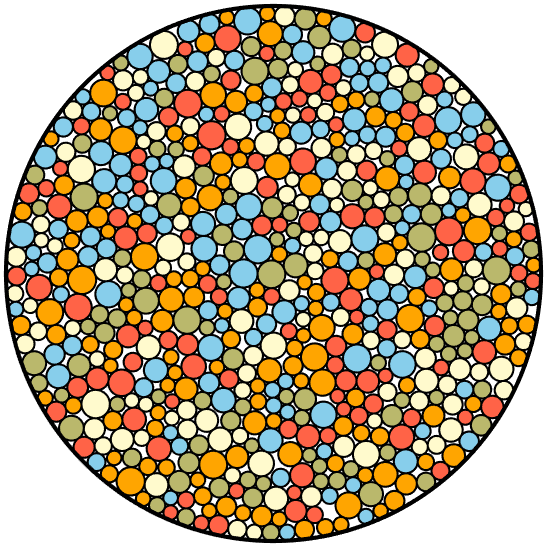
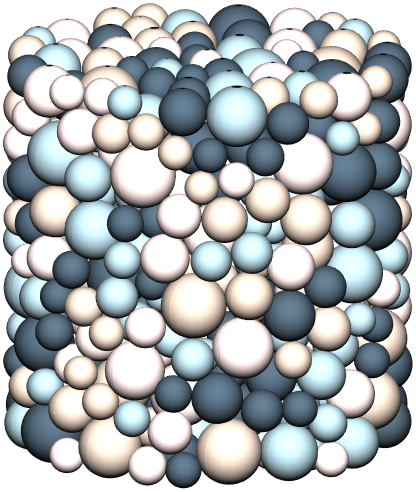
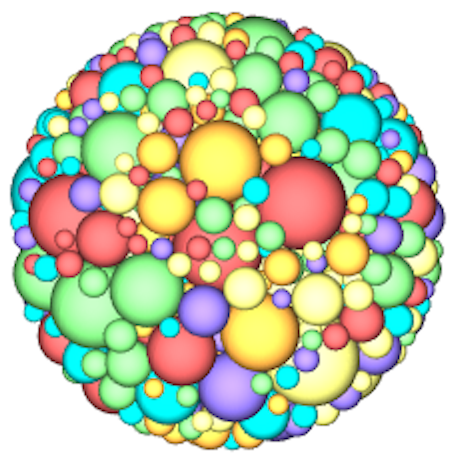
| Cropped dense rcp 2D packing; periodic boundary in x, hard boundary in y, and constrained height to be fixed multiple of largest diameter. | Dense 2D disk packing confined within circular container | Cylindrically confined packing of 3D spherical particles with upper and lower hard boundaries. | 3D packing of hard spheres, confined to a spherical container. |
Webapp for Visualization
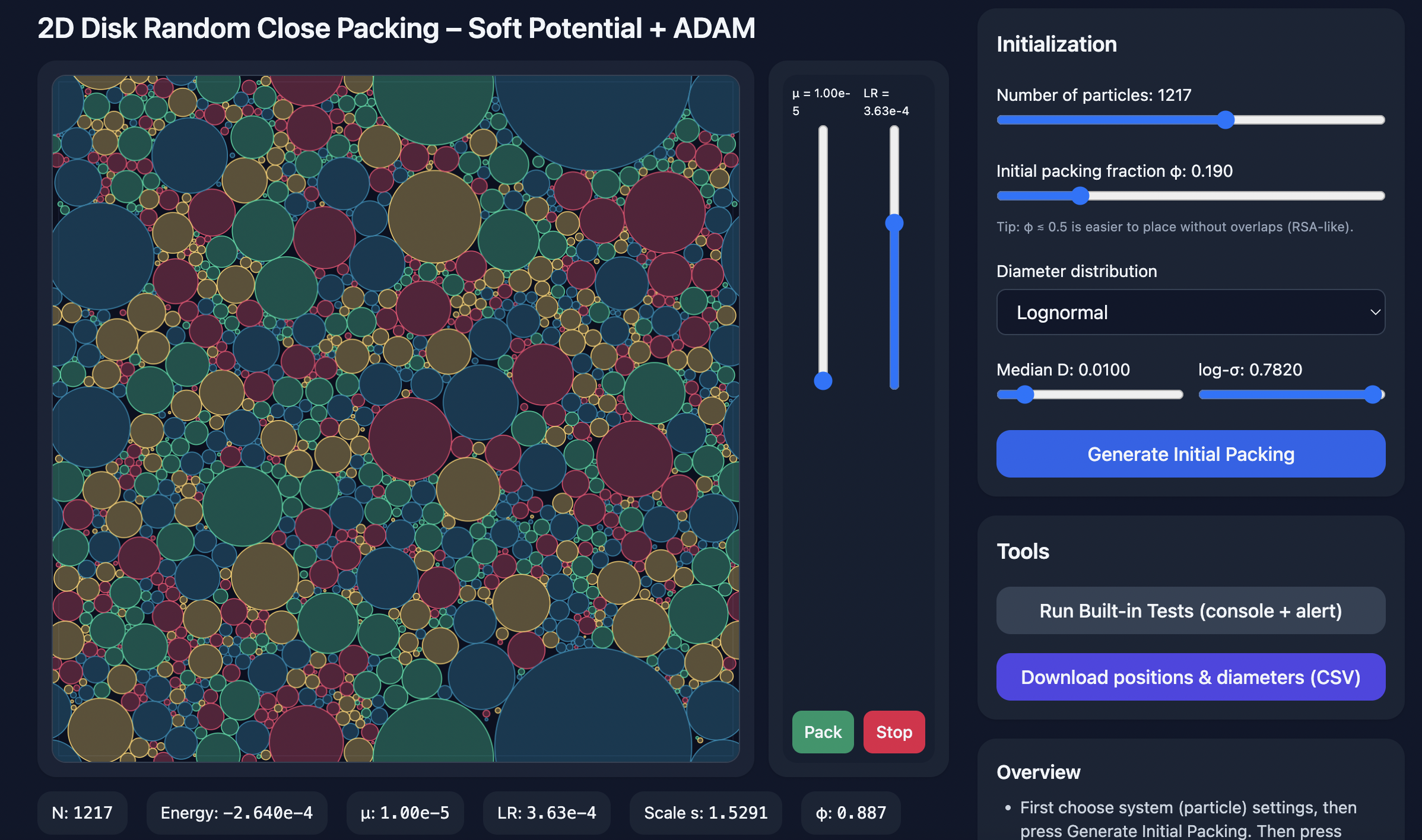
Features
- Generate packings via an algorithm using an iterative expansion–contraction scheme (Desmond & Weeks 2009).
- Support for various particle size distributions (monodisperse, bidisperse, Gaussian, power‑law, custom, and more).
- Periodic or hard‑wall boundary conditions (including circular, cylindrical, or spherical containers).
- Optionally fix container height as a multiple of the first particle diameter.
- If computer resources are sufficient, can generate packings in any arbitrary dimension of size 2 or greater
- Export and import packing data in plain‑text format.
- Both C++ and MATLAB routines included. Each set of code are independent whose functionality mirror each other.
- Able to handle very large size ratios, with prior success in generating packings that have particle diameter ratios > 100 in 2D, > 50 in 3D, > 15 in 4D, and > 5 in 5D.
Table of Contents
- Repository Structure
- Prerequisites
- Compiling & Installation
- Quickstart: Generating Dense Packings with C++
- Boundary Conditions & Containers
- Quickstart: Generating Dense Packings with Matlab
- Brief Overview of Packing Protocol (ADAM, AMSGrad, Verlet)
- Citation & Further Reading
Repository Structure
/c++
├ RCPGenerator.cpp         # Generates packings via ADAM optimerizer
└ InitializeParticles.cpp  # Initial position and diameter generator
/matlab
├ initialize\_particlesND.m    # Initial position and diameter generator
├ CreatePacking.m              # Generates packings via ADAM optimerizer
├ plot\_particles\_periodic.m  # Plot particles in 2D
├ plot\_particles\_3D.m        # Plot particles in 3D
└ example.m                    # end‑to‑end demo
README.md
LICENSE
Prerequisites
- C++: GCC or Clang supporting C++17
- MATLAB: R2022a or later
Compiling & Installation
cd c++
g++ -O3 -std=c++17 -o InitializeParticles.exe InitializeParticles.cpp
g++ -O3 -std=c++17 -o RCPGenerator.exe       RCPGenerator.cpp
No installation step required for the MATLAB scripts.
Quickstart: Generating Dense Packings with c++
1. Intializing Particle Positions and Diameters
First, particle positions and diameters must be generated in column format as x, y, z, …, D, where D is the diameter. You can create this data manually or use the provided InitializeParticles.cpp utility. There is no upper limit on the number of dimensions, though the minimum is 2D.
| The generated positions can be saved to a file and later loaded into RCPGenerator using the –file flag, or piped directly via | or <. |
An example use case for InitializeParticles.cpp is:
# Initializing 5% random packing of monodisperse spheres
./InitializeParticles.exe \
  --N 500 \
  --Ndim 3 \
  --phi 0.05 \
  --dist mono \
  --d 1.0 \
  --box 1,1,1 \
  --walls 0,0,0 \
  > init_500_3D.txt
This example would generate a intial packing of 500 particles in 3 dimensions at packing fraction 5%. The container size is 1 x 1 x 1, and all the diameters are equal in size. The positions and diameters are saved to init_500_3D.txt.
Important Note: You must supply flags N, Ndim, phi, dist (its parameters), box, and walls, otherwise you will get a Segmentation fault (core dumped) error!
Below is the full set of InitializeParticles.exe flags to adjust the type of packing that is initialized.
Command‑line Arguments for InitializeParticles (C++)
| Flag | Type | Default | Description |
|---|---|---|---|
--phi |
float | 0.05 | Target packing fraction |
--N |
int | — | Number of particles |
--Ndim |
int | — | Spatial dimensions (>=2) |
--box |
comma list | 1 repeated Ndim | Box lengths per dimension |
--dist |
string | — | Distribution type: mono, bidisperse, gaussian, biGaussian, lognormal, flat, powerlaw, exponential, weibull, custom |
--d |
float | — | Diameter (monodisperse) |
--d1 |
float | — | First diameter (bidisperse) |
--d2 |
float | — | Second diameter (bidisperse) |
--p |
float | — | Fraction (bidisperse, biGaussian) |
--mu |
float | — | Mean (gaussian) |
--sigma |
float | — | Std dev (gaussian) |
--mu1 |
float | — | Mean1 (biGaussian) |
--sigma1 |
float | — | Std1 (biGaussian) |
--mu2 |
float | — | Mean2 (biGaussian) |
--sigma2 |
float | — | Std2 (biGaussian) |
--d_min |
float | — | Min diameter (flat, powerlaw, exponential) |
--d_max |
float | — | Max diameter (flat, powerlaw, exponential) |
--exponent |
float | — | Exponent (powerlaw) |
--scale |
float | — | Scale (weibull) |
--shape |
float | — | Shape (weibull) |
--custom_list |
string | — | Comma-separated list for custom distribution |
--fix-height |
flag | false | Fix height dimension when scaling diameters |
--help |
flag | false | Show help message |
2. Generating RCP (C++)
RCPGenerator requires a set of initial particle positions and diameters provided in column format as x, y, z, …, D. This data can be piped in or loaded using the –file flag. A simple example is:
# Generate dense packing of monodisperse spheres using prior initialization
./RCPGenerator.exe --file init_500_3D.txt
This command uses all default settings: periodic boundaries in all directions, unit-sized container, and automatic inference of the number of dimensions and particles from the input data.
By default, the final packed positions will be printed to the terminal. To save the output to a file, you can use the –output flag, for example:
./RCPGenerator.exe --file init_500_3D.txt --output saved_positions
Alternatively, output can be redirected manually:
./RCPGenerator.exe --file init_500_3D.txt > saved_positions.txt
Note that .txt is automatically appended to the output filename when using the –output flag.
There are many additional flags available to customize the packing process, including:
–box to set the container size,
–walls to specify hard or periodic boundaries,
–verbose to print status updates during packing,
–fix-height to constrain the final packing height to be a user-defined multiple of the largest particle diameter.
# Initialize and densely pack 15000 particles in 3D with a powerlaw distribution of particle diameters
./InitializeParticles.exe --N 15000 --Ndim 3 --dist powerlaw --d_min 1.0 --d_max 15.0 --exponent -3 --phi 0.01 --box 1,0.5,1 > input.txt
./RCPGenerator.exe --file input.txt --output final_packing.txt --NeighborMax 1500 --box 1,0.5,1 --walls 0,1,0
In this example, the packing would have the following attributes
-
Number of particles (–N) : 15,000
-
Number of dimensions (–Ndim) : 3
-
Diameter distribution (–dist) : Power law with exponent -3 and the lower and upper limits from 1-15
-
Packing fraction (–phi) : 0.01
-
Container is box of widths (–box) : 1 along x, 0.5 along y, and 1 along z
-
Boundary conditions (–walls) : 0 (false) means periodic in x, 1 (true) means hard wall in y, 0 (false) means periodic in z
-
–NeighborMax : This one is a little tricky. The code works by building a maintaining a full list of possible nearby neighbors that gets updated periodically. The matrix that stores these possible neighbors is pre-assigned an allocation of memory based on the max number of expected neighbor neighbors. There are default values for NeighborMax but they might not be enough. If it isn’t the code will exit and tell you to increase this number. As the size ratio between large and small particles grows, the number of possible nearby neighbors will as well
Full list of options
| Flag | Type | Default | Description |
|---|---|---|---|
--file |
string | — | Input file (output of InitializeParticles.exe) |
--output |
string | packing_out.txt | Output file for relaxed packing |
--box |
comma list | — | Box lengths per dimension |
--NeighborMax |
int | 0 (auto) | Max neighbors for spatial binning (0 = automatic based on Ndim) |
--seed |
int | 0 | Seed for RNG (0 = time-based) |
--verbose |
flag | false | Print progress and debug messages |
--fix-height |
flag | false | Fix height dimension when scaling diameters |
--save-interval |
int | 0 | Interval (steps) to save intermediate packings (0 = off) |
--walls |
comma list | 0 repeated Ndim | Hard-wall flags per dimension (0 = periodic, 1 = hard wall) |
--MaxSteps |
int | 150000 | Still Need to Implement MaxSteps before it terminates without finishing |
Boundary Conditions & Containers
1. How to properly use fixed height
When using the --fix-height flag, both InitializeParticles.exe and RCPGenerator.exe must be given the same --box setting. In this mode, the last value in --box is interpreted as the desired container height in units of the first particle’s diameter. Internally, the workflow proceeds as follows:
-
Initialization (
InitializeParticles.exe)- You supply
--box x,y,...,wand--fix-height. - The last component
wis treated as a multiple of the first particle diameter. - The program rescales all particle diameters and sets the actual container height to
w × D₁, whereD₁is the first particle diameter in your generated list, while preserving the target packing fraction.
- You supply
-
Relaxation (
RCPGenerator.exe)- You supply the same
--box x,y,...,wand--fix-heightflags. - Again, the last
wis taken relative to the stored first particle diameter. - During expansion–relaxation, the container height is held at
w × D₁as particles expand or contract to meet the packing fraction.
- You supply the same
./InitializeParticles.exe --N 15000 --Ndim 3 --dist powerlaw --d_min 1.0 --d_max 15.0 --exponent -3 --phi 0.01 --box 1,0.5,4 --walls 0,1,0 --fix_height > input.txt
./RCPGenerator.exe --file input.txt --output final_packing.txt --NeighborMax 1500 --box 1,0.5,4 --walls 0,1,0 --fix_height
In this example, the final packing height (along the last dimension) will be exactly four times the first particle diameter. It’s critical that the –box values match between both executables when using –fix-height.
2. How to Use Circular (Hyperspherical) Boundaries
You can create circular (in 2D), cylindrical (in 3D), or hyperspherical (in higher dimensions) containers by setting the first value of the --walls flag to a negative integer -t. This indicates that the first t dimensions share a single spherical boundary of diameter given by the first --box component. All other --box and --walls values are then ignored except for periodicity in remaining dimensions.
-
2D circle (disk):
--box 1.5, 0.8 --walls -2, 0Creates a disk of diameter 1.5 with no periodic walls.
-
3D cylinder:
--box 1.5,1.0,0.8 --walls -2,0,0Creates an infinite cylinder of circular cross‑section diameter 1.5 (in the first two dims) and height 0.8 along the third (periodic by default).
-
3D sphere:
--box 1.5,0.8,0.8 --walls -3,0,0Creates a sphere of diameter 1.5 in all three dimensions.
-
4D hypersphere:
--box 1.5,1,0.8,3.0 --walls -4,0,0,1Creates a 4D hypersphere of diameter 1.5; remaining settings define periodicity only.
Note: After interpreting the spherical boundary, the code ignores any additional values in
--boxand--wallsbeyond those needed for the sphere (i.e. the remaining dims are purely periodic). Also I find that many times the program can struggle with cylindrical boundaries and maxes out the number of steps. However, the final packing is still quite close to rcp.
Quickstart: Generating Dense Packings with Matlab
All MATLAB scripts mirror the C++ functionality. See example.m script for complete demos.
Brief Overview of Packing Protocol (ADAM, AMSGrad, Verlet)
RCPGenerator implements an iterative expansion–relaxation scheme described in Desmond & Weeks (2009) [arXiv:0903.0864]. Starting from an initial set of particle positions and diameters, the algorithm alternates between expanding or contracting particle sizes and minimizing the overlap energy, gradually increasing the packing fraction until a jammed state is reached. At each set of steps once energy minimization is reached (determined by the degree to which forces are sufficiently balanced) the particle diameters expaned if particle overlap is mininal, otherwise particle diameters contract. Expansion and contraction rates decrease over time until the diameter adjustment step falls below a tolerance, at which point the algorithm terminates and returns the hard particle packing as the particle positions and diameters.
Energy minimization was originally implemented using a conjugate‑gradient solver in Desmond & Weeks (2009). Since then the ADAM optimizer was introduced for neural netork training, and here we find it performs much faster. As such, the ADAM optimize is utilized for rapid initial convergence, followed by AMSGrad for stability when ADAM stalls, and finally overdamped Verlet integrator if overlaps persist. If overlaps still persist it gives up and contracts the particle diameters. In practice, ADAM quickly removes most overlaps, but AMSGrad and Verlet help in reducing overlaps even more.
-
Initialization
- Load initial positions
xand diametersDfrom input. -
Set constants:
DELTA_PHI0 = 1.5 × 1.5e-3(initial φ step size)phi_min(dimension‐dependent minimum φ)N_STEPS = 150000,DT = 0.1, defaultMETHOD = "ADAM"
- Initialize optimizer state (ADAM/AMSGrad/Verlet), neighbor lists, and force arrays.
- Load initial positions
-
Main Loop (up to
N_STEPS)-
Force evaluation & neighbor management
- Recompute neighbor pairs every 750 steps or when particle displacements exceed a quarter of the minimum diameter.
- Compute forces
F, potential energyU, and minimum gap distances viaGetForcesND_3.
-
Optimizer switching
- ADAM for steps 1–2500 → switch to AMSGrad for steps 2501–4000 → switch to Verlet thereafter.
-
Triggers at:
- step > 2500:
method = "AMSGrad" - step > 4000:
method = "Verlet"
- step > 2500:
-
Diameter scaling
- On step 150, set
delta_phi = DELTA_PHI0. - Update
phi = max(phi + dphi, phi_min). - Compute and apply new diameters via
scale_diametersND(and scale box height if--fix-height).
- On step 150, set
-
Expansion vs. contraction
- If
U < U_threshold(≈6.25×10⁻⁸) ormax_min_dist < sqrt(U_threshold)×10, expand:dphi = delta_phi. -
Else if
U > U_thresholdandstep > 125:- If net force magnitude <
F_tol(≈5×10⁻⁶), contract:dphi = −delta_phi/2. - Otherwise hold:
dphi = 0.
- If net force magnitude <
- Adjust
delta_phiup/down based on oscillations or sustained progress.
- If
-
Position updates
- For ADAM/AMSGrad: standard ADAM updates using
m_hat,v_hat, and learning ratealpha. - For Verlet:
x += v_verlet×DT + 0.5×a_old×DT².
- For ADAM/AMSGrad: standard ADAM updates using
-
Termination
- Break when
delta_phi < 5e-6and overlaps/forces are below thresholds.
- Break when
-
-
Output
- Save intermediate packings if
--save-interval > 0. - On termination, write final positions + diameters to
--output.
- Save intermediate packings if
This loop alternates expansion when overlaps are low and contraction when overlaps are too large, steadily honing in on a tight random close packing.
- Summary of Internal Parameters
| Parameter | Default | Description |
|---|---|---|
N_STEPS |
10000 | Maximum number of expansion–relaxation iterations |
RECOMPUTE_FREQ |
50 | Steps between neighbor‐list updates |
EXPANSION_RATE |
1.001 | Multiplicative factor to increase particle diameters when energy is below threshold |
CONTRACTION_RATE |
0.999 | Multiplicative factor to decrease diameters when energy overshoots |
ENERGY_TOL |
1e-6 | Energy threshold for switching between expansion and contraction phases |
DIAMETER_TOL |
1e-8 | Diameter‐change threshold for convergence |
| ADAM: | ||
- LR_ADAM |
1e-2 | Learning rate for ADAM optimizer |
- BETA1 |
0.9 | Exponential decay rate for ADAM’s first moment estimate |
- BETA2 |
0.999 | Exponential decay rate for ADAM’s second moment estimate |
- EPSILON_ADAM |
1e-8 | Numerical stability constant for ADAM |
| AMSGrad: | ||
- LR_AMS |
1e-3 | Learning rate for AMSGrad |
- EPSILON_AMS |
1e-8 | Numerical stability constant for AMSGrad |
| Verlet: | ||
- DT_VERLET |
1e-3 | Time‐step size for Verlet integration |
Citation & Further Reading
This project is released under the MIT License.
- Desmond, K. W., & Weeks, E. R. (2014). Influence of particle size distribution on random close packing of spheres. Physical Review E, 90(2), 022204. arXiv:1303.4627
- Desmond, K. W., & Weeks, E. R. (2009). Random close packing of disks and spheres in confined geometries. Physical Review E, 80(5), 051305. arXiv:0903.0864
- Original Algorithm Methodology: A. S. Clarke and J. D. Wiley (1987), *Numerical simulation of the dense random packing of a binary mixture of hard spheres: Amorphous metals, Phys. Rev. B 35, 7350
Contact
Kenneth Desmond — [@